The short answer
If you only need to see each other’s times, a free shared Google Calendar is enough for most couples, and an iCloud shared calendar works just as well if you both use iPhone. Pick a dedicated app when you also want key dates, lists, or a clear owner for the prep behind each plan. Tiptoe is the pick for that last part.
- Free, works everywhere: Google Calendar.
- Free, both on iPhone: an iCloud shared calendar.
- A couples app with a free plan: Cupla.
- Calendars for several groups: TimeTree.
- A family with kids: Cozi, or FamilyWall if you also want location sharing.
- A busy social life: Howbout.
- The calendar plus who preps, chores and a weekly check-in: Tiptoe.
Disclosure: Tiptoe makes one of these apps, and this page is written by its founder. Tiptoe is listed first because it is built for exactly two people and ties plans to owners, not because of a score. For many couples a free calendar is the right answer, and we say so.
How we compared
We wrote this for the partner who is usually the one saying “wait, that is this Saturday?” A good couples calendar should mean neither of you has to be the household’s memory. We compared each option on six things:
- Two-person sharing: how you share it, and whether one plan covers both of you.
- Cost for two: the published price for both partners, as of our check.
- Key dates: birthdays, anniversaries and countdowns, not just appointments.
- Tasks: whether the prep behind a plan, like buying the gift, can live next to it.
- Existing calendars: whether it works with the work and personal calendars you already have.
- Privacy: whether the app also shares location or other data you might not want in a planner.
Every competitor fact comes from the app’s own website, help center or official App Store listing, checked on September 30, 2026, with links in each entry. Prices are US list prices where published. “Not found in official docs” means we could not find the feature in the company’s own materials, not that it definitely does not exist. We did not use star ratings or download counts.
Comparison table
Checked September 30, 2026 on each app’s official site or store listing. US prices unless noted, which can change by region and over time. Scroll sideways to see every column; app names stay pinned on the left.
| App | Built for | How two people share | Cost for two, as checked | Key dates and birthdays | Tasks with the calendar | Works with existing calendars | Email-in invites | Platforms | Best for |
|---|---|---|---|---|---|---|---|---|---|
| Tiptoe | Couples | One couple, both people's plans marked by person | Free for both of you. Pro is $9.99/month. One Pro covers both | Yes: birthdays, anniversaries, your own dates | Yes. Dated tasks and chores show on the calendar | Optional Google Calendar sync. Subscription link for Apple, Google, Outlook on Pro | On Pro. Each person has an address to forward invites to | iPhone and web | Couples who want the calendar and who preps in one place |
| Google Calendar | Everyone | Share a calendar by email, five permission levels | Free with a Google Account | Add as events | Separate from a couples task list | It is the existing calendar | Invites arrive by email as usual | Web, Android, iPhone | Couples who only need times, at no cost |
| Apple iCloud shared calendar | Apple users | Private share needs an Apple Account and iCloud. Public read-only link for others | Free | Add as events | Separate, in Reminders | It is the existing calendar | Invites arrive by email as usual | iPhone, iPad, Mac, iCloud.com | Two iPhone users who want it free |
| Cupla | Couples | Premium is one subscription per couple | Free plan. Premium: several prices listed, see site | Yes, with countdowns | Shared to-dos, chores, grocery lists | Syncs Apple, Google, Outlook and other device calendars | Not found in official docs | iPhone, Android, desktop app | Couples who want a calendar-first app and a free plan |
| TimeTree | Groups: couples, families, friends, work | Create a calendar, invite people | Free. Premium $4.49/month or $44.99/year | Birthdays | Memos and to-do lists | Works with Google, Apple and Outlook (store listing) | Not found in official docs | iPhone, Android, Apple Watch, web | Couples who also share calendars with family or friends |
| Cozi | Families | One family account, up to 12 members | Free with ads. Gold $39/year | Birthday tracker on Gold | Shared to-do and shopping lists | Read-only import of Google, Apple, Outlook and iCal feeds | Not found in official docs | iPhone, Android, web | Households with kids and one family calendar |
| FamilyWall | Families and groups | Premium covers the whole family or group | Free. Premium $4.99/month or $44.99/year | Add as events | To-dos, shopping lists, meal planner | Google and Outlook sync on Premium | Not found in official docs | iPhone, Android, desktop | Families who also want location sharing |
| Howbout | Friends first, also couples | Share availability. Howbout+ is per person | Free. Howbout+ $3.99 to $5.99/month or $39.99/year, per person | Not found in official docs | Not found in official docs | Google and Apple Calendar sync | Not found in official docs | iPhone, Android, web | Couples who plan around a wide friend group |
The apps
Each entry covers what the app does well, who should skip it, and what it costs for two people.
Tiptoe
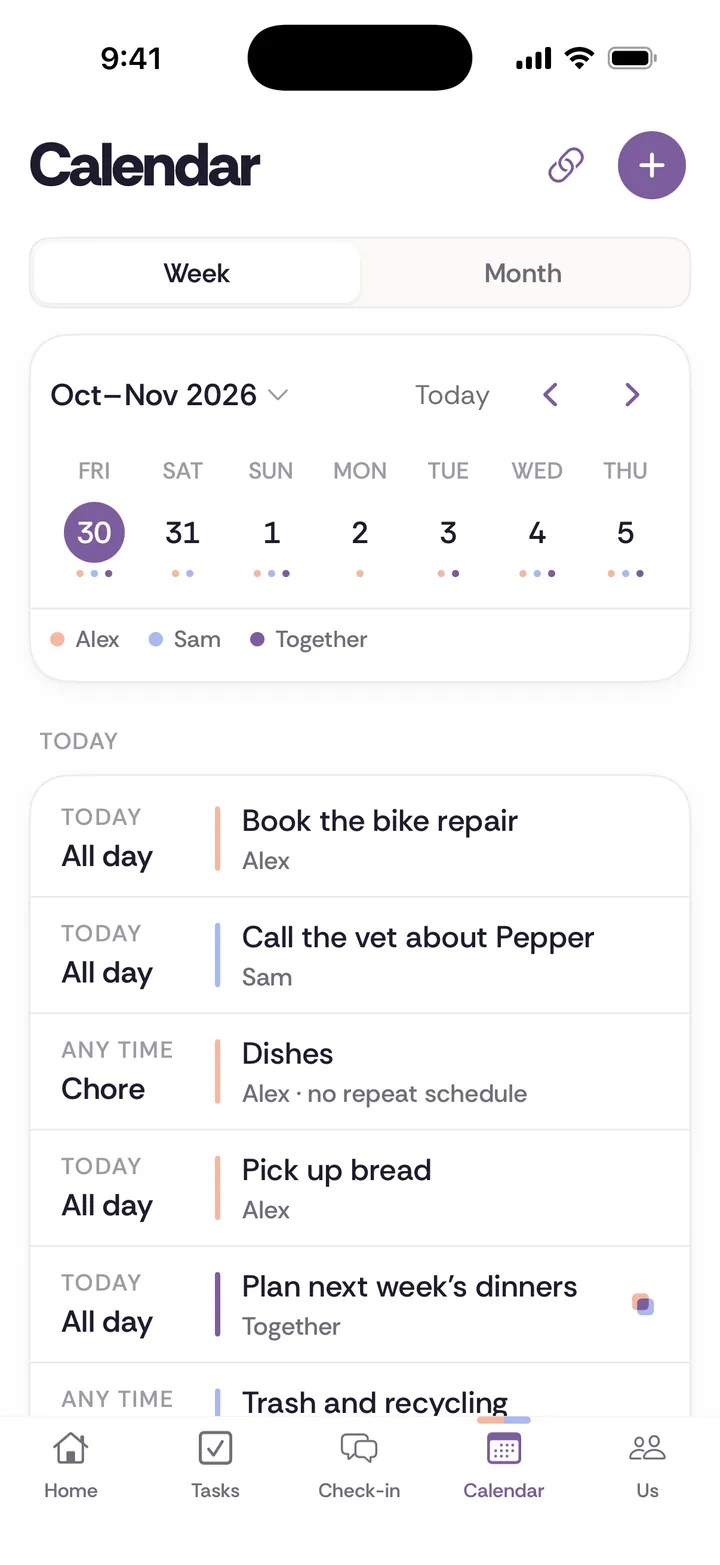
Tiptoe’s Calendar shows today and the week ahead for both of you, with each person’s plans marked so you can tell whose is whose. Birthdays, anniversaries and your own small milestones live there as key dates. Tasks and chores with a day or time show up on the calendar too, so the plan and the prep sit side by side.
You do not have to move your existing calendar. Connecting Google Calendar is optional. With Pro, a private subscription link shows Tiptoe plans in Apple Calendar, Google Calendar or Outlook, and each of you gets an email address for calendar invites: forward an invite to it and the event lands on the Tiptoe calendar, marked as yours. Around the calendar are shared tasks, chores with one owner each, lists and a weekly check-in, which is where “who is handling Saturday” gets settled.
The limits: the calendar feed and email-in are part of Pro, and it is built for two people, not a whole family. There is no native Android app; the web app works in any browser.
- Good for
- Couples who want one week view for both of you, plus the tasks, chores and check-in that decide who handles what.
- Not for
- Families with kids who each need a calendar, or anyone who only needs times and wants it free.
- Cost for two
- Free for both of you. Pro is $9.99/month. No card needed. Your first 30 tasks and chores are free.
Checked September 30, 2026: Calendar in Tiptoe, Tiptoe pricing.
Google Calendar
Google Calendar is the default for a reason. You can share any calendar with your partner by email and choose how much they can see or change, from free and busy only up to making changes and managing sharing. It works on the web, Android and iPhone, so it suits mixed-phone couples. The common setup is a new shared calendar for joint plans, plus each person sharing their own calendar so the other can see busy times.
What it will not do is tell you who is buying the gift or booking the restaurant. Events have a time, not an owner.
- Good for
- Couples who mainly need to see each other's times, especially if either of you uses Android.
- Not for
- Anyone hoping the calendar will also settle who books the sitter or buys the gift.
- Cost for two
- Free with a Google Account. Sharing is built in.
Checked September 30, 2026: Google Calendar Help: share your calendar.
Cupla
Cupla is the closest thing to a calendar-first couples app. It syncs the calendars already on your phone, including Apple, Google and Outlook, so each of you sees the other’s schedule without moving anything. It adds key dates and countdowns, shared to-dos with reminders, grocery lists, chores, wishlists and a date planner. Cupla says Premium is one subscription per couple, which is the right model for two people.
The free plan is genuinely useful but limits your partner’s events and to-dos to a window around today. If Cupla is what you use now and you want a direct comparison, read Tiptoe vs Cupla.
- Good for
- Couples who want a calendar-first couples app that merges the calendars you already have, with a free plan to start.
- Not for
- Couples who want unlimited views of each other's plans for free: the free plan limits your partner's events and to-dos to a window around today.
- Cost for two
- Free plan with limits. Cupla says Premium is one subscription per couple. The App Store lists several monthly and yearly prices, so see site for yours.
Checked September 30, 2026: cupla.app, Cupla help: free vs paid.
TimeTree
TimeTree is built for sharing calendars with any group, and you can have as many calendars as you like: one for the two of you, one for family, one for the climbing group. Events can hold memos and chat, and the app has to-do lists and birthdays. It suits couples whose plans overlap with lots of other people. It is less helpful when the real problem is household jobs rather than events.
- Good for
- Couples who want separate shared calendars for the two of you, the family and the friend group.
- Not for
- Couples who want the calendar tied to who owns each job.
- Cost for two
- Free with ads. Premium is $4.49 a month or $44.99 a year with a free first month, and TimeTree notes pricing may vary by region. The page does not say whether Premium covers other members.
Checked September 30, 2026: timetreeapp.com/premium, App Store listing.
Cozi
Cozi is a long-running family organizer. Everyone in the family uses one account and sees one color-coded calendar, plus shared shopping and to-do lists. It can import Google, Apple, Outlook and other iCal calendars, read-only, refreshed about hourly, and export Cozi events the same way. Gold adds a birthday tracker, month view on mobile and change notifications. For two adults without kids, it can feel like more family structure than you need.
- Good for
- Families who want one color-coded calendar plus shopping and to-do lists everyone can see.
- Not for
- Couples who need two-way sync with their work calendars: imports are read-only.
- Cost for two
- Free with ads. Cozi Gold is $39 a year, and Cozi says one upgrade covers everyone in the family.
Checked September 30, 2026: cozi.com/faq, Using Cozi with other calendars, Compare plans.
FamilyWall
FamilyWall bundles a shared calendar with shopping lists, to-dos, a meal planner, messaging, photos, a budget and real-time location with place alerts. Google and Outlook sync is a Premium feature. Its own pages disagree about which features are free, so check the current plan list before you rely on a specific one. If location tracking is a dealbreaker for either of you, look elsewhere.
- Good for
- Families who want a calendar, lists, messages and real-time location in one app.
- Not for
- Couples who do not want location tracking anywhere near their planner.
- Cost for two
- Free plan. Premium is $4.99 a month or $44.99 a year with a 30-day trial, and FamilyWall says it covers the whole family or group.
Checked September 30, 2026: familywall.com, FamilyWall Premium.
Howbout
Howbout is a social calendar: you share when you are free, busy or maybe, and make plans with friends, with chat on each plan. It syncs with Google and Apple calendars and also offers location sharing. It is good at finding a night that works for six people, and the paid tier is per person, not per couple.
- Good for
- Couples whose busiest calendar is social: finding a night that works for you and your friends.
- Not for
- Running a household: there are no chores or shared to-dos documented.
- Cost for two
- Free. The App Store lists Howbout+ from $3.99 to $5.99 a month or $39.99 a year, and Howbout says Howbout+ applies only to your individual account.
Checked September 30, 2026: howbout.app/about, What is Howbout.
A calendar answers when, not who preps
Most calendar fights between couples are not about the time of the event. They are about the work around it. The dinner on Saturday is on the calendar, but someone also has to book the table, arrange the dog walker, buy the bottle of wine and remember that your partner’s friend does not eat gluten. That someone is usually the same person every week.
So when you set up a shared calendar, decide where the prep lives. In a plain calendar, put it in the event notes with a name: “Sam books, Alex handles the dog.” In Tiptoe, add it as a task with an owner and a due date so it shows up on the same calendar. Either way, the rule is the same: every plan that needs prep gets an owner for the prep, not just a time.
One useful rule
If a plan needs anything done before it happens, give that job a name and an owner when you add the plan.
How to set up a couples calendar in 10 minutes
- Keep your own calendars. Do not merge work and personal calendars into one. Share them with each other so you can see busy times.
- Make one shared calendar for joint plans. Call it Us or Home. Both of you can add and edit.
- Add the next 12 months of key dates. Birthdays, anniversaries, renewals, school holidays, family visits.
- Add a reminder two weeks before each key date, with an owner for the gift or plan.
- Pick a weekly look-ahead. Five minutes on Sunday to scan the week and assign the prep. A weekly check-in is a natural home for it.
- Agree on one rule for new plans: if it involves both of you, it goes on the shared calendar before you say yes.
For more on what belongs on the calendar and how to keep it current, read the full couples calendar guide. If you use Tiptoe with Google Calendar, the Google Calendar help article explains the connection.
Questions couples ask
- What is the best free shared calendar for couples?
- A shared Google Calendar is the best free option for most couples, because it works on iPhone, Android and the web. If you both use iPhone, an iCloud shared calendar is just as good. Cupla and TimeTree also have free plans if you want a couples or group app.
- Can Google Calendar work as a couples calendar?
- Yes. Create a new calendar called something like Us, share it with your partner with permission to make changes, and put shared plans there. Keep your personal calendars visible to each other if you like. It covers times well, but it does not track who owns the prep.
- How do couples share calendars on iPhone?
- In the Calendar app or on iCloud.com, share a calendar and invite your partner. Apple says private sharing needs the invitee to have an Apple Account and use iCloud. A public calendar can be viewed by anyone with the link, but it is not private.
- Should we merge our calendars?
- Usually not. Keep your own calendars and add one shared calendar for plans that involve both of you. Merging everything floods each person with the other's meetings. Sharing visibility, so each of you can see the other's busy times, gives you the benefit without the noise.
- What should go on a couples calendar?
- Anything that needs both of you or affects the other person: plans together, trips, family events, birthdays and anniversaries, appointments that need a ride or childcare, and late nights at work. Add the prep too, such as buying the gift or booking the sitter, with an owner.
- Do couples calendar apps work across iPhone and Android?
- Many do. Google Calendar, Cupla, TimeTree, Cozi, FamilyWall and Howbout list both iPhone and Android. Apple's private iCloud sharing needs an Apple Account for each invitee. Tiptoe works in any browser today, including on Android phones.