A shared calendar is built to answer a useful question: when is something happening? If your main problem is overlapping appointments or finding a free evening, a calendar you both use is a sensible place to begin. Check the features of your actual calendar, since sharing, reminders, and synchronization differ between products.
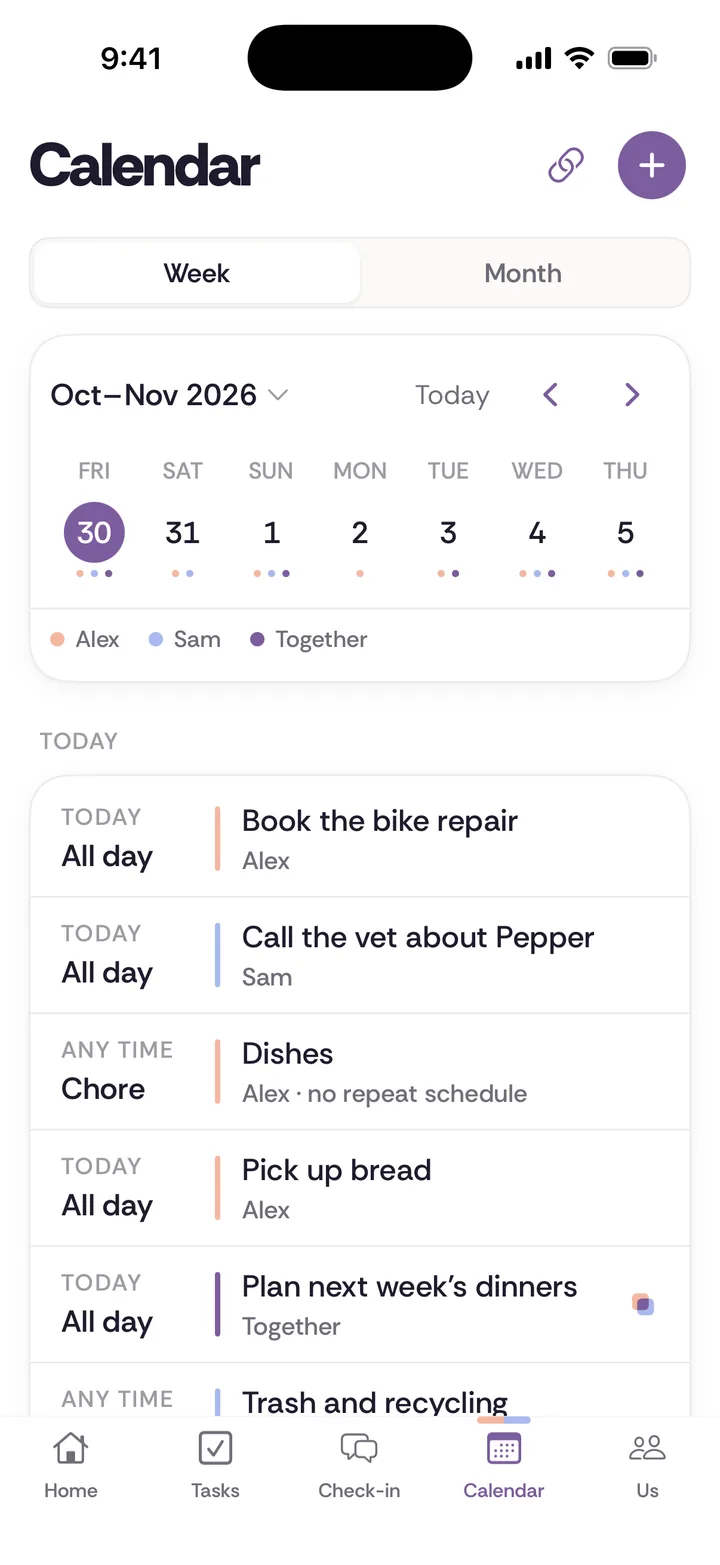
Tiptoe has a shared calendar for events, dated tasks, chores, trips, key dates, and check-ins. A private subscription link works with Apple Calendar, Google Calendar, and Outlook, and optional Google Calendar two-way sync is available when configured. This is a category comparison from the Tiptoe team. The honest choice may be to keep your calendar and use another tool only for a different job.
Keep time commitments where they belong
A calendar can show an appointment, duration, location, and the people involved, depending on the tool you choose. It can be especially useful when two schedules affect a shared car, childcare, visits, or time together. If the central question is availability, putting more detail into a couples app may not solve it as directly as keeping the calendar current.
Agree which events need sharing and what information each person wants visible. Shared planning does not require exposing every private appointment or granting continuous access to someone's whereabouts. Use the calendar's controls deliberately, and confirm that both partners understand what the arrangement reveals.
A date is different from the work before it
A birthday on a calendar tells you when the occasion falls. It may not tell you who notices the need to plan, chooses a gift, checks the budget you agreed, or follows up. You can add tasks or notes in your existing tools if they support that workflow. The key is to give the preparation an owner rather than expecting the date itself to delegate it.
Tiptoe key dates hold birthdays, anniversaries, holidays, and personal milestones. Shared tasks can hold a next action, while private gift ideas stay with the giver. A date you both want can go on the shared calendar with one person arranging it. Those workflows sit around the occasion. They do not buy gifts or make reservations, and any plan still needs an owner for the practical follow-through.
Choose where the small conversations live
A calendar can reserve time for a weekly check-in. The agenda itself may work better in a note, on paper, or in a tool designed for it. Putting “talk about the kitchen” on a shared event also makes that wording visible wherever the event is shared. Check the audience before using a calendar as a draft space.
Tiptoe topics start as private drafts and become shared when queued. The weekly check-in brings together appreciations, tasks, ownership trends, key dates, date plans, and queued topics. Answers stay private until both partners submit. These reveal rules are different from simply inviting someone to an appointment. The weekly check-in questions can work with either approach.
Avoid creating two sources of timing truth
If you use both tools, agree what belongs in each. For example, keep appointments and availability in the calendar, and use Tiptoe for responsibilities, date choices, and check-in agreements. Confirm any time-sensitive plan in the place you already rely on. Calendar subscriptions flow from Tiptoe into another calendar. When Google two-way sync is configured, connected Google changes can sync in both directions; other supporting details still need clear ownership.
That extra step is a real tradeoff. If avoiding manual updates is essential, do not assume an integration exists because a product mentions dates. Ask for the actual behavior before subscribing. A key-date feature, a calendar view, and two-way synchronization are different capabilities.
Try the smallest useful combination
Choose one upcoming occasion and one recurring responsibility. Keep the time commitment in your existing calendar. Decide whether the preparation is already easy to manage or whether it keeps returning to the same person's memory. The mental load guide helps describe that surrounding work before choosing software for it.
For partners living apart, the long-distance ritual separates logistics from time together. For anyone considering another subscription, the couples app checklist covers platform and privacy questions. Keep the calendar if it works. Add Tiptoe only if its distinct workflows are useful enough to both people to justify maintaining them.
A worked example: an anniversary next month
Start with the occasion in your calendar. Both people know the date, and any time commitment can go in the calendar once it is agreed. Then list the surrounding questions: do you want to do something, which evening fits, what kind of activity appeals, and who takes the next planning step? The answers may belong in a note or task tool before there is an event to schedule.
Tiptoe can hold the key date and put the plan on the shared calendar with one person arranging it. A plan is not a reservation. Someone still needs to check the practical details and arrange anything the activity requires.
If you choose a time in Tiptoe, it can appear in a subscribed Apple Calendar, Google Calendar, or Outlook calendar. Google two-way sync is also available when configured. Keep one source of timing truth and confirm which connected calendar controls later changes.
The same distinction applies to visits with relatives. A calendar can show the visit; it does not automatically answer who replies, packs, arranges food, and follows up. The holiday worksheet helps you name those responsibilities before deciding which tool should remember them. Scheduling and ownership are related jobs, but one is not a substitute for the other.
Ask both partners what is easiest to check
One person may live in a calendar while the other mainly reads a shared list. An elegant tool combination is not useful if the people using it disagree about where a confirmed plan lives. Choose one reliable home for timing and say which other tool contains supporting details.
When testing a tool, ask each person to find the next commitment without help. Then ask where they would look to learn who is arranging it. If the answer requires a tour through several screens, simplify the arrangement. You are allowed to choose fewer tools even when each tool has a feature you like. The household needs a plan you can find, not a demonstration of every available integration.
Try it in Tiptoe
Use the public demo to compare one real responsibility, then read the plans and terms. Free for both of you. Pro is $9.99/month. No card needed. Your first 30 tasks and chores are free.
Questions before choosing
Do we need to replace our current tool?
No. Keep it if both people use it and it handles the problem. Choose clear boundaries if you use more than one tool, so you do not maintain competing versions of the same plan.
What does it cost for two?
Tiptoe is free for both of you. Pro is $9.99 a month and adds unlimited tasks and chores, Insights, every past check-in, a calendar feed and email tasks in. No. You share one space, and Free covers both of you. If you choose Pro, one subscription covers both partners. Your free account includes your first 30 tasks and chores. Every one you create counts, open or done, and deleting one doesn't give it back.
Is there a native iPhone app?
Tiptoe is on iPhone, and the same shared week is on the web at app.tiptoe.ai.