A spreadsheet can hold a household inventory, a chore rotation, a moving checklist, or a plan you want to filter and rearrange. Its flexibility is a good reason to use one. If both people understand the sheet and someone enjoys maintaining it, there may be no missing tool to buy.
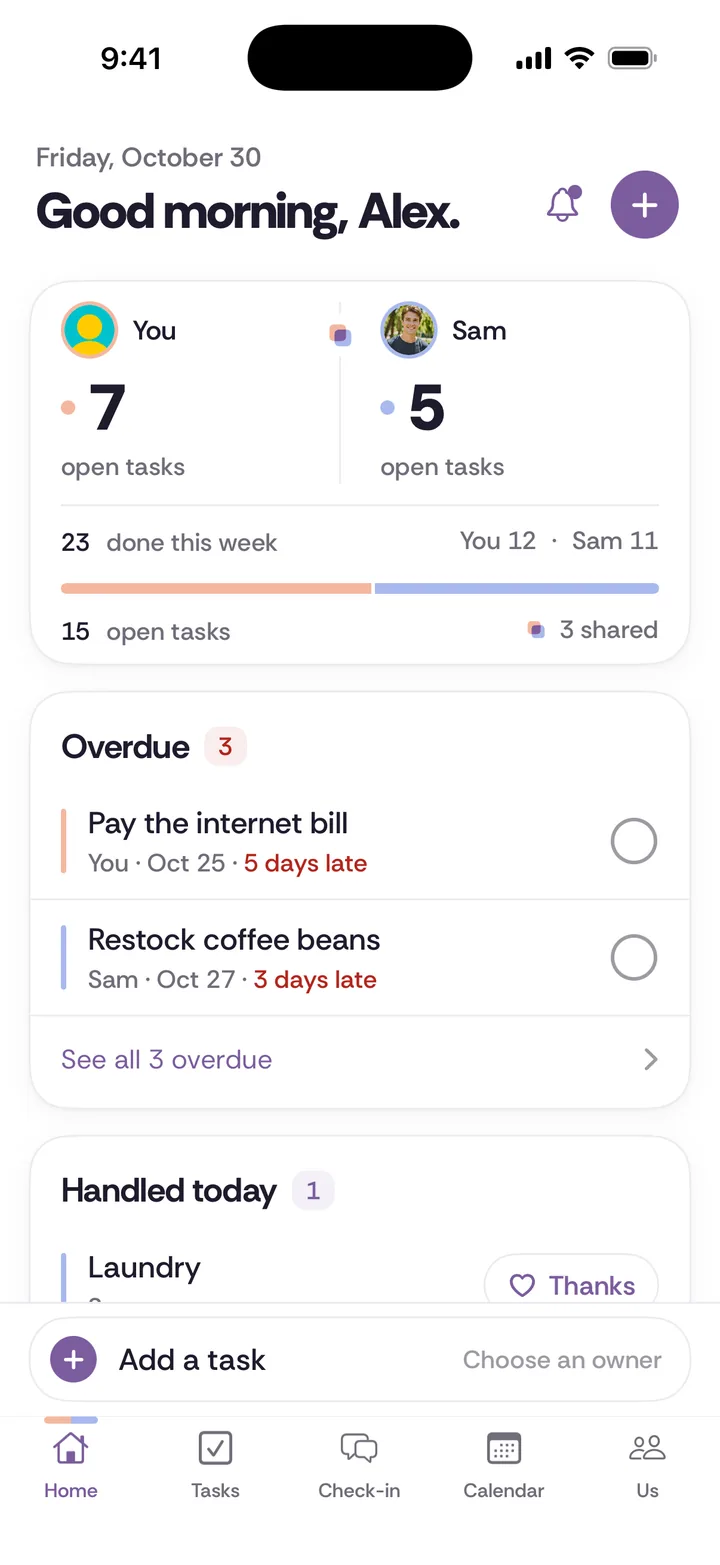
Tiptoe offers predefined couples workflows with sharing rules and a weekly check-in. It trades some of a spreadsheet's flexibility for less structure to invent yourself. This comparison is written by the Tiptoe team, not an independent reviewer. It does not claim that every spreadsheet or every couple has the same needs.
Where rows and columns earn their place
Choose a spreadsheet when you want to customize categories, sort a long inventory, compare options, or use formulas you understand. You can add an owner column, a due-date column, and notes about what finished means. The layout can follow your household instead of asking your household to follow a product's model.
That flexibility also creates maintenance work. Someone needs to decide which column is current, what a blank cell means, and whether a proposed change has been accepted. For a simple sheet, this may be trivial. For a growing household system, the person who built it may become its unofficial support desk. Ask whether both partners can use it without a demonstration every week.
Where a couples app supplies the structure
Tiptoe shared tasks have assignments, due dates, recurrence, and completion. Chores handle ongoing responsibilities and proposed handoffs that the other partner can accept or decline. Shared lists handle checkable items. You do not need to invent those distinctions as column headings or agree that a certain cell color means someone has actually said yes.
The tradeoff is that Tiptoe is not a general spreadsheet. It does not promise arbitrary formulas, custom reporting, or the ability to model any household process. If your sheet does a specific job well, keeping it may be simpler than forcing that job into another format. Choose based on the real workflow, not on whether a tool sounds more specialized.
Be deliberate about private and shared information
A shared spreadsheet can expose more than you intend if both people can access the whole document. Some tools provide permissions and other controls, but a hidden tab is not automatically a private space. Read the behavior of the particular product before putting surprise gifts or private conversation drafts into it.
Tiptoe separates private gift ideas and private tasks from shared records. Queuing a topic shares it. Both partners submitting creates the check-in reveal. Partner profile facts are shared, including What I've learned. These are explicit product rules, not a claim that every piece of information is private in every context.
Keep money tools in the right place
A spreadsheet may be useful for a financial calculation if you understand and verify the formulas. Tiptoe P1 does not include bank linking, imported transactions, or an expense tracker. It can hold a conversation topic or a next action around a money decision. That does not replace financial records or qualified advice.
If your main reason for using a spreadsheet is financial modeling, Tiptoe is not a like-for-like replacement. Use the money conversation script to discuss a decision while keeping calculations in a suitable tool. Avoid moving sensitive financial details into a household app merely to reduce the number of tabs you have open.
Test who maintains the system
Ask both people to add and complete a real task, find an existing agreement, and change a responsibility in your current sheet. Notice where an explanation is needed. Some friction may be solved by simplifying the sheet. Other friction may come from the absence of a workflow, such as distinguishing a handoff request from an accepted transfer.
Compare the same example in Tiptoe's public demo. Ask whether both people understand the sharing rules and whether the predefined structure fits your actual week. A polished interface is not evidence that either person will use it. Try the responsibility that already creates questions, not a fictional example with a conveniently cooperative deadline.
Choose one home for each job
You can keep a spreadsheet for a detailed inventory and use another tool for check-ins or responsibilities. Make the boundary explicit so neither person maintains two versions of the same information. The simpler arrangement may be to stay entirely with the sheet. The couples app checklist helps decide what a new subscription would need to earn.
For a starting chore arrangement, read the complete chore guide or print the worksheet. Tiptoe is on iPhone, and the same shared week is on the web at app.tiptoe.ai. Add it for the workflows you want, with a clear understanding of what still belongs somewhere else.
A worked example: the first month living together
A spreadsheet can list boxes, purchases, appointments, and ongoing chores on separate tabs. You can sort by owner or timing and see a large amount of information at once. For a move with many one-off tasks, that overview may be exactly what you need. Make the column meanings obvious so both partners can update the same plan without asking its creator first.
As the move ends, decide which rows should disappear and which represent continuing work. “Buy a bin” ends. “Handle bins and supplies” continues. If the spreadsheet becomes a permanent household system, someone needs to keep those different kinds of records clear. You can do that with a simpler sheet, a written convention, or a tool that already separates them.
Tiptoe shared tasks and lists can hold the move's next actions, while chores carry the recurring responsibilities afterward. A check-in can hold a conversation about visitors or quiet time, with tasks saved when both people decide. It does not manage a lease, track expenses at P1, or replace a spreadsheet's general calculation functions.
Try the example with the information you actually need this week. Enter a modest shopping list and one responsibility you have agreed. Ask whether your partner can understand the state of each item without a separate explanation. If the new app makes ordinary updates clearer, that is useful evidence. If the sheet remains easier for both people, that is useful evidence too.
Keep an exit path and a current version
Check export and sharing behavior before building a large collection of personal information. Tiptoe offers JSON/CSV exports and lets partners uncouple. Uncoupling archives the shared space, with shared information available for export by both people. Private records remain separated according to the product's privacy rules.
A spreadsheet's export, access controls, and revision history depend on the product you use. Verify the actual behavior rather than assuming every cloud document handles sharing in the same way. In either tool, copies already exported may continue to exist elsewhere. Make the current working version easy to identify and do not treat a new format as a reason to scatter the same private information across more places.
Try it in Tiptoe
Use the public demo to compare one real responsibility, then read the plans and terms. Free for both of you. Pro is $9.99/month. No card needed. Your first 30 tasks and chores are free.
Questions before choosing
Do we need to replace our current tool?
No. Keep it if both people use it and it handles the problem. Choose clear boundaries if you use more than one tool, so you do not maintain competing versions of the same plan.
What does it cost for two?
Tiptoe is free for both of you. Pro is $9.99 a month and adds unlimited tasks and chores, Insights, every past check-in, a calendar feed and email tasks in. No. You share one space, and Free covers both of you. If you choose Pro, one subscription covers both partners. Your free account includes your first 30 tasks and chores. Every one you create counts, open or done, and deleting one doesn't give it back.
Is there a native iPhone app?
Tiptoe is on iPhone, and the same shared week is on the web at app.tiptoe.ai.