Disclosure: Tiptoe makes this page, and Tiptoe is one of the apps below. We tried to write it so that it is still useful if you choose something else, and several of these apps will suit some couples better than ours.
The best shared to-do list app for a couple is the one that matches your two phones, shows who owns each item, and costs nothing extra for the second person. If you both have iPhones and want something free today, start with Apple Reminders. If one of you is on Android, Todoist or Microsoft To Do will work on both phones for free, and if you want chores, a calendar and a weekly check-in in one place, look at Cupla, Cozi or Tiptoe. This is true whether you are setting it up with a husband, wife, boyfriend or girlfriend.
All competitor prices and features below were checked on each company's own site or App Store page, as of November 2026. Prices change, so check before you pay.
What should you check before picking an app?
Most roundups compare feature lists. A couple's real questions are narrower, and four of them settle most decisions.
- Does it work on both phones? An app one partner cannot install is over before it starts. Tiptoe, for example, has no Android app.
- What does it cost for two, not one? Some plans cover the couple and some charge per person. Some free plans do not allow sharing at all.
- What does "assign" actually do? In some apps it sets one owner on one task. In others it only colors a list.
- Does it handle repeating work? Trash, bills and the dishwasher come back. A list that only handles one-off errands will miss most of a household.
There is one more question that no feature grid answers. Every chore has four jobs: notice, plan, do, and follow up. An app can record who does a task, but the mental load usually sits in the other three. So whichever app you choose, agree that the owner of an item owns all four jobs. Our guide to the four jobs in every chore walks through that with examples.
Apple Reminders
What it is. The to-do app that comes with iPhone, iPad and Mac, with shared lists through iCloud.
Price for two. Free. It comes with your Apple devices.
Platforms. iPhone, iPad, Mac, and a browser at iCloud.com. Everyone must be signed in to an Apple Account with Reminders turned on in iCloud.
How assigning works. In a shared list, type @ and a name, or tap the Person button. Each person gets an Assigned to Me Smart List. You can only assign after the list has been shared. Repeats are set per reminder, and there is a grocery list type that sorts items into categories.
Who should pick it. Two iPhone users who want no new app and no new account. Our step-by-step guide is Apple Reminders for couples.
Google Keep and Google Tasks
What they are. Keep is a notes and checklist app. Tasks is Google's to-do list, and they work quite differently when shared.
Price for two. Keep is listed as free on the App Store.
Platforms. Keep has help pages for computer, Android and iPhone and iPad, so it covers a mixed-phone couple.
How assigning works. Keep's sharing help describes adding collaborators to a note, not assigning items to one of them, so a Keep list says what needs doing but not whose job it is. A workaround is two labeled sections, one for each name. In Tasks, shared tasks are created in a Google Chat space or a Google Doc, and they cannot repeat, and the Docs route needs an eligible Google Workspace plan.
Who should pick it. Keep is a good grocery list for any couple, especially with mixed phones. It is a weaker fit for chores because it has no owners. See Google Keep for couples for the steps.
Microsoft To Do
What it is. A plain, free list app tied to a Microsoft account.
Price for two. Free, by Microsoft's own description in its App Store listing.
Platforms. iPhone, iPad and Apple Watch on that listing, plus Android, Windows and the web.
How assigning works. You share a list with an invitation link, then open a task and assign it to a member of that list. Assigned items show up in an Assigned to you list. Two details matter: both of you need a Microsoft account, and moving an assigned task to another list removes the assignment.
Who should pick it. A couple who already use Outlook or Windows and want free, real assigning on any phone.
Todoist
What it is. A well-known general to-do app, built for personal use and teams.
Price for two. The free Beginner plan allows 5 personal projects with 5 people per project, and includes assigned tasks, comments and task reminders. Pro is $5 a month billed yearly or $7 month to month. The pricing page lists no couple or family plan, so two Pro accounts would be $10 a month on yearly billing. Calendar layout, deadlines and custom reminders are not on the free plan.
Platforms. Mac, Windows, Linux, iPhone, iPad, Android, Apple Watch and Wear OS, plus browser.
How assigning works. Share a project, then pick one person per task. For something you both have to do, Todoist suggests sub-tasks or duplicate tasks. Repeating due dates are typed in plain words, like "every Tuesday."
Who should pick it. A couple where one or both already love Todoist, or anyone wanting one app for work and home. More in Tiptoe vs Todoist.
Any.do
What it is. A to-do and planning app with a dedicated Family plan.
Price for two. The Family plan is $8.33 a month billed yearly or $9.99 month to month, for up to four members, so a couple pays the same as a family of four. The free plan includes your Personal Space only, and Any.do's product documentation lists sharing under Family or Teams. One Any.do blog post describes free shared lists, so confirm in the app before you plan around that.
Platforms. iPhone, Android, web and Mac, with browser extensions. Any.do's documentation says there is no native Windows app and points Windows users to the web.
How assigning works. On a shared board, use Assign Member. Assigned tasks appear in that person's My Day and other views. Family includes up to four shared boards or grocery lists, and each person keeps a private space. Reminders can arrive by WhatsApp.
Who should pick it. Couples who want a polished planner with a shared grocery list that sorts by aisle, and who want each person's private tasks kept separate. More in Tiptoe vs Any.do.
Cupla
What it is. A shared calendar built for couples, with to-dos, grocery lists, wishlists and a date planner.
Price for two. One subscription per couple, from $4.99 a month. The free version limits how far ahead you can see your partner's events and to-dos, and you cannot see partner to-dos that have no date. Your own items are not limited.
Platforms. iPhone, Android and a web app in beta.
How assigning works. Cupla's facts page says to-dos can be assigned to one partner, the other, or both, with priorities, labels, reminders and repeats.
Who should pick it. A couple whose main problem is the calendar and date planning, and who like that it syncs two ways with Google, Apple and Outlook. See Cupla alternatives if you are comparing.
Cozi
What it is. A long-running family organizer with a calendar, lists, recipes and meal planning.
Price for two. Free, or Gold at $39 a year, or Max at $79 a year. Gold removes ads and adds month view on mobile and more reminders. The App Store listing says Gold also covers events more than 30 days ahead.
Platforms. iPhone, Android and web. The family shares one account, and each person signs in with their own email and the shared password.
How assigning works. This one needs a close read. In ordinary to-do lists, the owner is set on the whole list, assigning does not alert anyone, and it is mainly a color code. Cozi Chores gives each person a list of daily or weekly chores on iOS and Android.
Who should pick it. Families with children and activities who want everything on one shared calendar and meal plan. See Cozi alternatives.
FamilyWall
What it is. A family organizer with calendar, shopping lists, task lists, messaging and a photo gallery.
Price for two. Free, with Premium at $7.99 a month or $44.99 a year on the App Store. Premium covers the whole family and adds things like meal planning, a budget tracker and Google or Outlook sync.
Platforms. iPhone and iPad on that listing, Android, and any web browser.
How assigning works. The listing says task lists let you assign to-dos to selected family members, and it lists that among the free features.
Who should pick it. Couples with a mixed-phone household who want free assigning plus family messaging.
AnyList
What it is. A grocery list and recipe app, not a general to-do app.
Price for two. There is a free tier, and AnyList Complete is $14.99 a year for a household.
Platforms. iPhone, iPad, Apple Watch, Android, Mac and the web.
How assigning works. AnyList shares lists so changes appear for everyone. Its pages describe sharing, not assigning.
Who should pick it. Couples whose real problem is groceries and dinner. It pairs well with any other app on this page.
Tiptoe
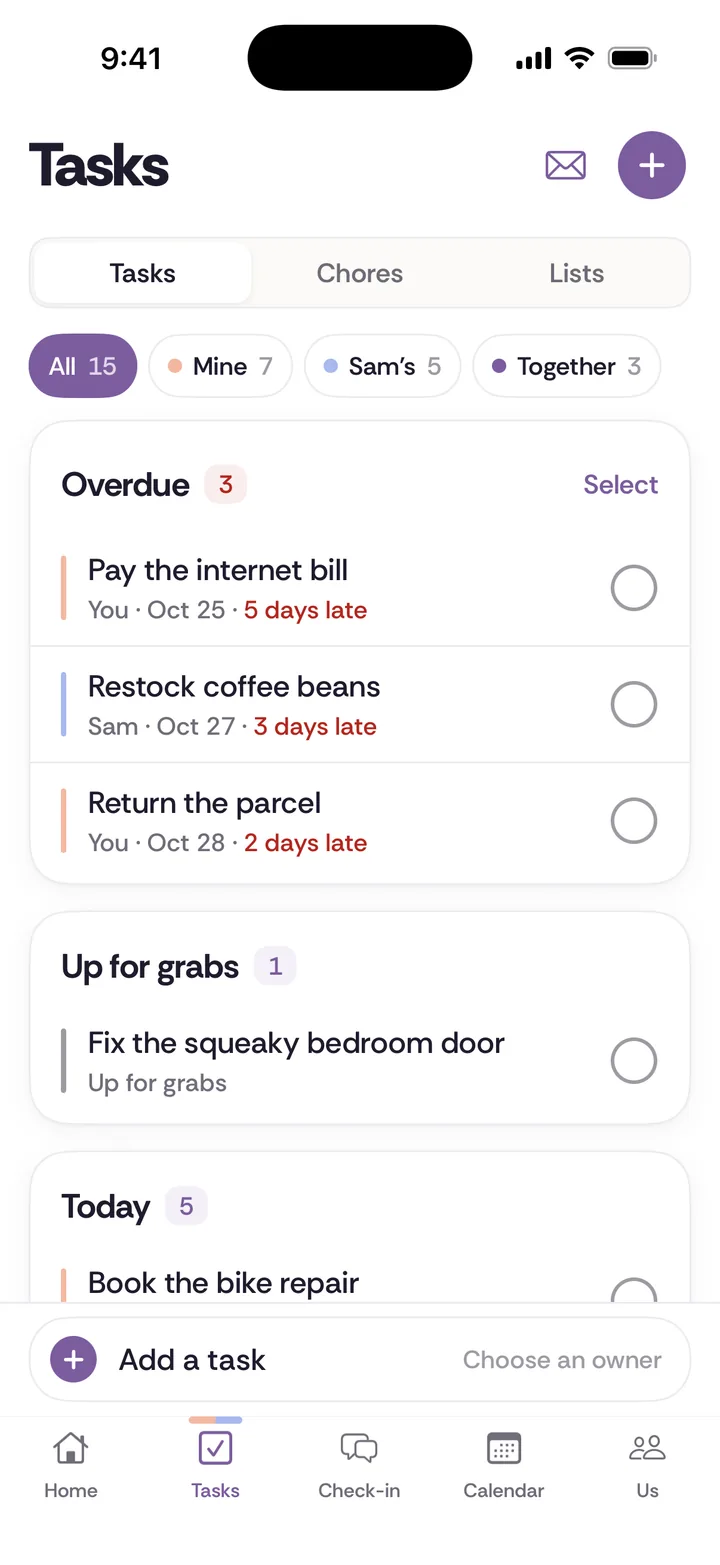
What it is. Our app. Shared tasks, repeating chores, lists, a calendar and a weekly check-in, for two people.
Price for two. Free for both partners with no card, for the couple's first 30 tasks and chores combined, and deleted items still count. After that, Pro is $9.99 a month, billed monthly, and one subscription covers both of you.
Platforms. iPhone and web. There is no Android app, so an Android partner would use the web version.
How assigning works. Each task goes to You, your partner, or Together. Each chore repeats on a schedule and has one owner, and handoffs are proposed rather than imposed. A completed item counts for the person it was assigned to, so credit follows the agreement instead of a running score.
Who should pick it. An iPhone couple who want chores and a weekly check-in in one place, and who are fine paying once the first 30 items are used. If you need Android, or want one app for work and home, one of the others is the better choice.
Which one should you choose?
Use your situation, not a score.
- Two iPhones, want free today: Apple Reminders.
- One iPhone, one Android, want free assigning: Microsoft To Do, Todoist or FamilyWall.
- You mainly need a grocery list: Google Keep, or AnyList if you also plan meals.
- Your main problem is two calendars that never match: Cupla, with our couples calendar guide as background.
- You have kids and school schedules: Cozi or FamilyWall.
- You want chores with one owner and a weekly talk about them: Tiptoe, or see our chore app comparison for apps built around chores.
If you want a list of options that goes beyond to-dos, we also keep a page on the free apps that are really free for two.
How do you try one without starting an argument?
An app choice can easily become a stand-in for a larger disagreement, so keep the test small. Say something like this:
"Can we try one shared list for two weeks? Just the trash, the dishwasher, and the car stuff. Each one has one name on it. If you hate the app after two weeks, we drop it."
Then do these things in order.
Step 1. Pick three or four repeating items, not your entire household.
Step 2. Put one name on each. Avoid "both" unless you truly do it together.
Step 3. Agree what done means for each, in a sentence. "Trash is out by 8 on Thursday night" beats "take care of the trash."
Step 4. Decide what happens if something slips. For example, you can ask once, then leave it with the owner.
Step 5. After two weeks, ask two questions: Did the list stop you asking? Did it stop you checking?
If you do not want any app, the same test works on paper. Write the items and names on a sheet on the fridge and look at it together once a week. Our chore split worksheet is free to print, and the chore split calculator estimates weekly hours in your browser, without storing anything. An app can remember an agreement, but the two of you still have to make it.